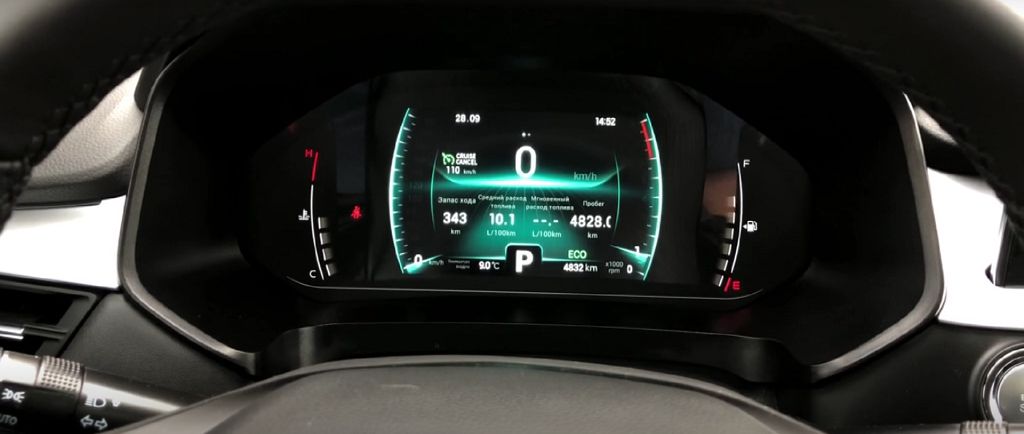
Okay, let’s dive right into the Chery Tiggo SEVEN/Pro/Max dashboard. First impressions? It’s a pretty sleek digital instrument panel, isn’t it? I really like the modern look, although I’ll admit, the initial setup felt a little… overwhelming. There’s a lot going on, and figuring out how to navigate through all the different display modes took some time. But once you get the hang of it, it’s actually quite intuitive.
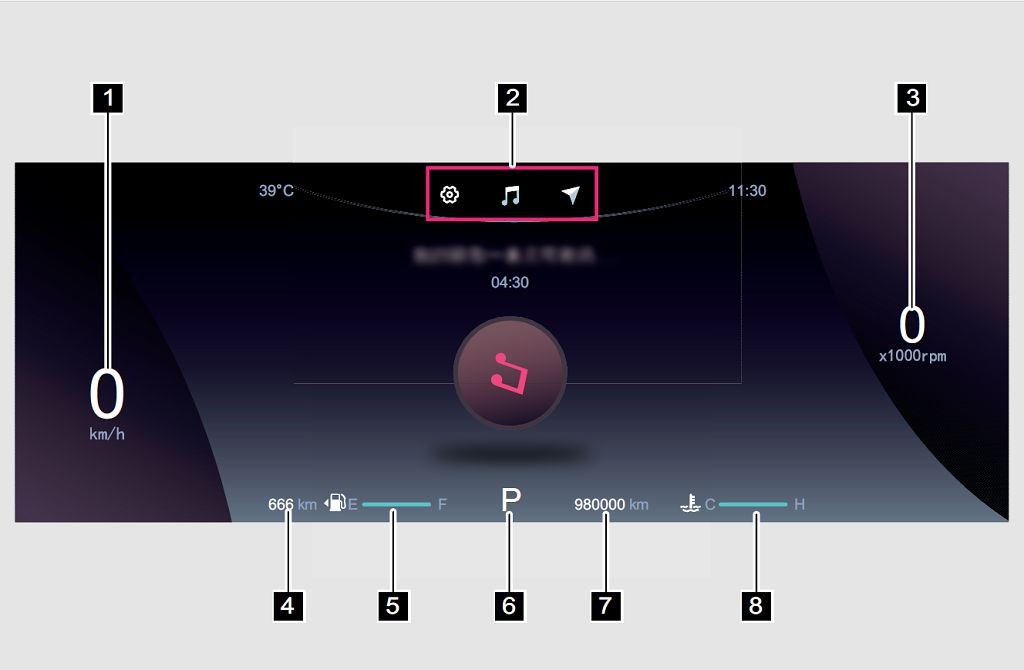
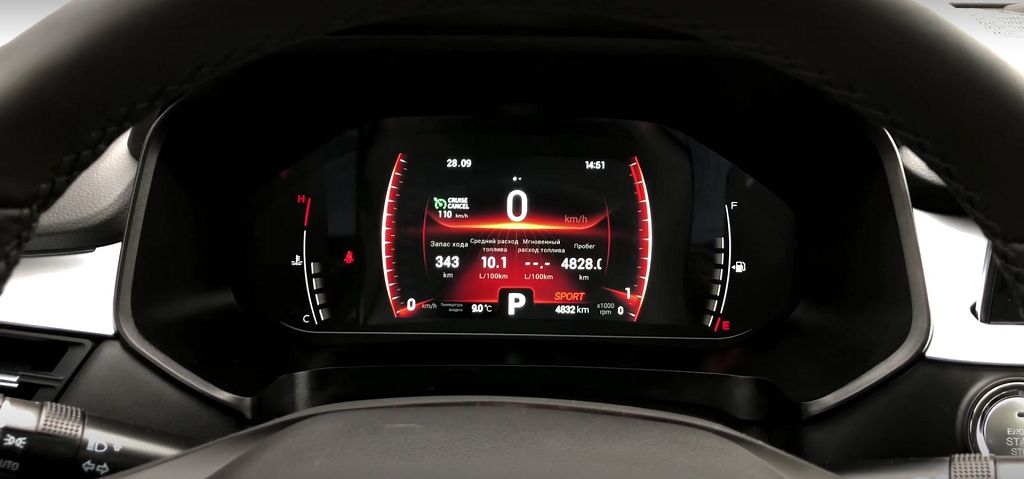
Let’s start with the overall layout. You’ve got your central speedometer, of course, nice and prominent. To the left, you’ll find your fuel gauge, displayed digitally, and it’s surprisingly accurate. I’ve been keeping a close eye on it, and it matches my actual fuel consumption pretty well. On the right, you have your tachometer, also digital, and it’s easy to read even at a glance. Between the speedometer and the tachometer, you’ll see a whole bunch of other information constantly cycling through. This is where things get interesting.
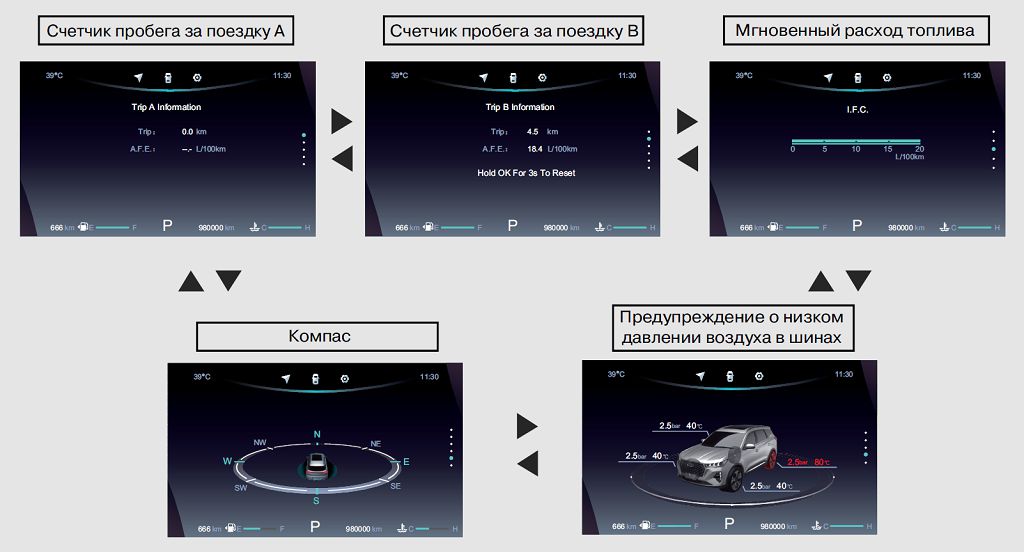
Now, let’s talk about the display modes. There are at least FIVE different modes you can cycle through, each offering a slightly different view of your vehicle’s performance and status. The first mode, which is the default, shows you the standard speedometer, tachometer, fuel gauge, and a few other basic metrics like the odometer and trip meter. It’s clean and simple, perfect for everyday driving.
The second mode is where things start to get more interesting. This mode gives you a much more detailed look at your vehicle’s performance. You’ll see things like your real-time fuel consumption, average speed, and even the outside temperature. It’s great for those who like to keep a close eye on their vehicle’s efficiency.
Mode THREE is all about navigation. If you’ve got your navigation system active, this mode will display a simplified map right in your instrument cluster. It’s not as detailed as the main navigation screen, but it’s handy for quick glances at your route without taking your eyes off the road for too long. I found this particularly useful in unfamiliar areas.
Mode FOUR is a bit of a mixed bag. It displays a variety of information, including things like tire pressure, engine temperature, and various warning lights. It’s a good mode to check periodically to make sure everything is running smoothly. However, I found the information a little too scattered, and it could be presented more clearly.
Finally, Mode FIVE is what I call the «eco» mode. It focuses primarily on fuel efficiency, showing you your current fuel consumption and offering tips on how to improve it. It’s a great mode for those who are conscious about their fuel economy. It even gives you a score based on your driving habits, which is a fun little feature.
Now, while the Tiggo SEVEN/Pro/Max’s digital instrument panel is visually appealing and offers a decent amount of information, I do have a few minor gripes. The graphics, while modern, aren’t the sharpest I’ve seen. And the responsiveness could be improved slightly. Sometimes, switching between modes takes a little longer than I’d like. But overall, it’s a functional and reasonably user-friendly system. It’s not perfect, but it gets the job done. And the sheer number of display options is definitely a plus. It’s just a matter of finding the mode that best suits your needs at any given time.
So, let’s dive straight into the cost of replacing or repairing that electronic dashboard in your Chery Tiggo 7, Pro, or Max. Now, this is tricky because the price varies wildly depending on where you are, what parts are needed, and if you’re going through a dealership or an independent mechanic. I’ve seen prices ranging from a few HUNDRED dollars for minor repairs, maybe a faulty sensor or a simple software glitch, all the way up to TWO THOUSAND dollars or more for a complete dashboard replacement. That’s a significant chunk of change, so definitely shop around and get multiple quotes before committing to anything. Remember to factor in labor costs as well; that can often be a substantial portion of the total bill. It’s always a good idea to check online forums and communities for Chery Tiggo owners – you might find someone who’s had a similar experience and can give you a more accurate estimate for your specific region.
- Читайте также:
Next up, let’s compare the digital dashboards across the Chery Tiggo range. The Tiggo SEVEN’s digital display is a noticeable step up from what you’ll find in the Tiggo FOUR. The Tiggo FOUR’s dashboard, while functional, feels a bit dated compared to the SEVEN’s sleek, modern design. The SEVEN boasts a much larger, higher-resolution screen, offering crisper graphics and more intuitive menu navigation. The information presented is also more comprehensive, giving you a clearer picture of your vehicle’s performance and status. Now, when we compare the Tiggo SEVEN to the Tiggo EIGHT, the differences are more subtle. Both offer impressive digital displays, but the EIGHT might have slightly enhanced graphics or a few extra features depending on the trim level. It really comes down to the specific year and model of each vehicle – there are always minor variations between different production runs. But generally speaking, the Tiggo SEVEN’s dashboard holds its own against its siblings.
Finally, let’s talk about those driving modes. The Chery Tiggo SEVEN, Pro, and Max offer a selection of driving modes, usually accessible through the dashboard controls. These modes typically include options like «Eco,» «Normal,» and «Sport.» «Eco» mode prioritizes fuel efficiency, adjusting throttle response and transmission shifting for optimal economy. «Normal» mode provides a balanced driving experience, suitable for everyday use. And «Sport» mode sharpens throttle response and transmission shifts, making the car feel more responsive and dynamic. However, the exact functionality and availability of these modes can vary slightly depending on the specific model year and trim level. Some models might even include additional modes like «Snow» or «Off-Road,» designed to optimize performance in challenging conditions. It’s always best to consult your owner’s manual for a complete and accurate description of the driving modes available in your specific Chery Tiggo. Remember to experiment with these modes to find what best suits your driving style and preferences.