Let’s dive into the Chery Tiggo FOUR/Pro’s cruise control system. First, we’ll look at what makes it tick – its system composition. Essentially, it’s a sophisticated network of sensors and electronic control units working together seamlessly. You’ve got your speed sensor, constantly monitoring your vehicle’s velocity. This information is fed to the Electronic Control Unit, or ECU, the brain of the operation. The ECU also receives input from the brake pedal switch, the accelerator pedal position sensor, and the steering wheel angle sensor. These sensors are crucial for ensuring the system operates safely and effectively. Think of it like this: the speed sensor tells the ECU how fast you’re going, the brake pedal switch tells it when you’re braking, the accelerator pedal position sensor tells it how much gas you’re giving it, and the steering wheel angle sensor helps the system understand if you’re making any significant steering inputs. All this data is processed by the ECU to maintain a consistent speed. There’s also a crucial component often overlooked: the vacuum pump. This is responsible for actuating the throttle, allowing the system to maintain the set speed. It’s a complex interplay of parts working in harmony.
Now, let’s talk about the principle of operation. It’s all about maintaining a constant speed. Once you’ve activated cruise control, using the controls we’ll discuss in a moment, the system takes over the throttle. The ECU uses the speed sensor’s data to compare your current speed to the set speed. If you’re going slower than the set speed, the ECU signals the vacuum pump to increase the throttle, gently accelerating you back to the desired speed. Conversely, if you’re going faster, it reduces the throttle, slowing you down. It’s a continuous feedback loop, constantly adjusting to maintain that set speed. However, it’s important to remember that this is not a completely autonomous system. The system will disengage if you touch the brake pedal, accelerator pedal, or significantly alter the steering wheel angle. It’s designed to assist, not replace, your driving. The system also has a minimum speed requirement – you can’t activate it at a standstill. There’s typically a speed threshold, usually around TWENTY-FIVE or THIRTY kilometers per hour, before the cruise control becomes active.
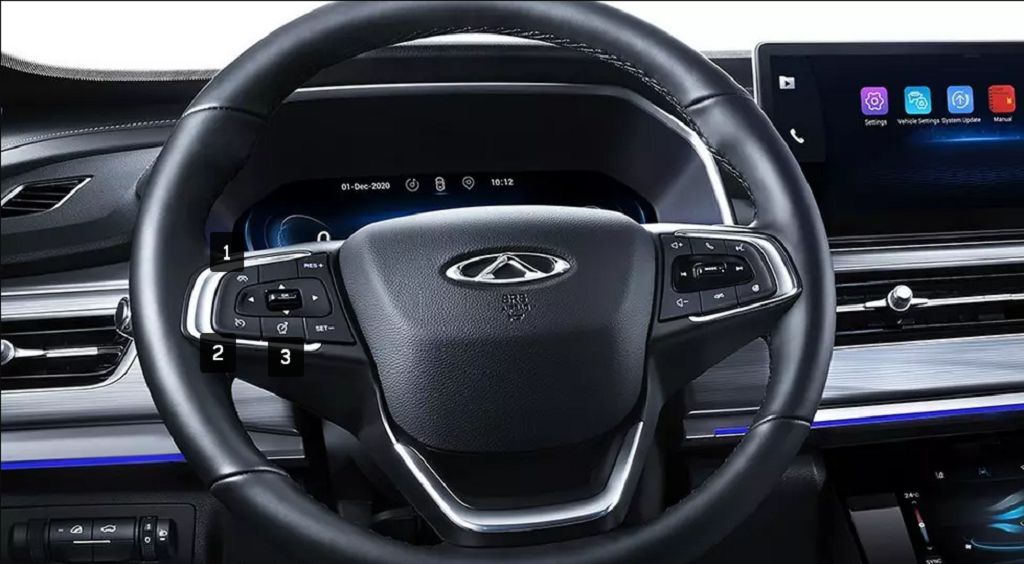
Finally, let’s explore the control keys themselves. These are usually located on the steering wheel, offering easy access while driving. You’ll typically find a button to turn the cruise control system ON and OFF. There’s usually a «SET» button to set your desired speed. Once you’ve reached your desired speed, pressing «SET» locks that speed in. Then there are «RES» (Resume) and «CANCEL» buttons. «RES» is useful if you temporarily disengage the cruise control – for example, to overtake – and want to quickly return to your previously set speed. «CANCEL» completely deactivates the cruise control system. And finally, you’ll have buttons to increase or decrease the set speed, usually indicated by «+» and «-» symbols. These allow you to fine-tune your desired cruising speed without having to completely disengage the system. It’s important to familiarize yourself with the location and function of each button before using the cruise control system on the road. Remember to always practice safe driving habits, even when using cruise control.
Okay, let’s dive into the Chery Tiggo FOUR/Pro’s cruise control system. First up, activating and deactivating it. It’s pretty straightforward, really. You’ll find the controls usually on the steering wheel – look for buttons labeled «CRUISE» or something similar. To activate, you’ll typically need to be above a certain speed, maybe around TWENTY-FIVE miles per hour – check your owner’s manual for the exact figure. Once you’re rolling, press the «SET» or «ON» button. The speed you’re currently traveling at will be set as your cruise speed. To increase or decrease speed, use the «+» and «-» buttons. Simple enough, right? Deactivating is just as easy. You can either gently tap the brake pedal, which will immediately disengage the cruise control, or you can press the «CANCEL» or «OFF» button. Remember, the cruise control is a driver-assistance feature, not a replacement for your own attentiveness. Always keep your hands on the wheel and be ready to take control at any moment.
Now, let’s talk about the limitations. Cruise control isn’t magic; it has its boundaries. For instance, it won’t work effectively, or at all, on steep inclines or declines. Think of those winding mountain roads – you’ll likely need to manually control your speed there. Similarly, it won’t function well in heavy traffic or when the road is slippery, like during rain or snow. The system is designed to maintain a constant speed under ideal conditions, and it’s crucial to understand its limitations to drive safely. Also, remember that you’ll need to disengage the cruise control before making any sharp turns or navigating complex intersections. It’s always better to be safe than sorry.
Let’s move on to adaptive cruise control, if your Tiggo FOUR/Pro has it. This is a more advanced system that can automatically adjust your speed to maintain a safe distance from the vehicle in front. However, even this sophisticated system has its limits. Adaptive cruise control will often deactivate under several conditions. For example, if the vehicle in front brakes suddenly or unexpectedly, the system will disengage to allow for immediate driver intervention. Similarly, if visibility is significantly reduced due to fog, heavy rain, or snow, the system might shut itself off to prevent potential accidents. Also, if the system detects a malfunction, it will automatically deactivate as a safety precaution. It’s important to understand that adaptive cruise control is a helpful tool, but it’s not a substitute for attentive driving.
Finally, what’s important to know about the Chery Tiggo FOUR/Pro’s cruise control in general? Well, always refer to your owner’s manual for the most accurate and up-to-date information. The manual will provide specific details about your vehicle’s cruise control system, including activation procedures, limitations, and any safety precautions. It’s also a good idea to familiarize yourself with all the warning lights and indicators associated with the cruise control system. Understanding these signals will help you respond appropriately to any potential issues. Remember, responsible and informed use of cruise control enhances your driving experience and improves safety, but it should never replace your own judgment and attentiveness behind the wheel. Always be aware of your surroundings and ready to take control at a moment’s notice.